Logs
See where every asset sends its logs, and query your own CloudWatch, S3, Google Cloud and Azure logs where they are, without copying them.
Your inventory already knows where your logs are: every log group, and where each trail, flow log, load balancer, bucket, function and database writes. AssetHermit lists them with no setup. Connect a log source and you can also query those logs from AssetHermit. The query runs in your own cloud, with your cloud's own engine, and nothing is copied out of it.
Log queries is in beta, on request. Ask for access from the Help menu in the app: it opens a support request.
Where your logs are
The Logs section's Catalog tab lists the workspace's log sets, found in what each sync collects. Each log set is one body of logs in one place, such as a log group or a bucket prefix. Each one shows what's written to it, the assets that write it, its account, retention and size.
- On AWS: log groups, and what writes to them or to S3: functions, CloudTrail trails, VPC flow logs, load balancers' and buckets' access logs, API Gateway stages, RDS databases and EKS clusters.
- On Google Cloud: Cloud Logging buckets, log sinks and the BigQuery datasets and Cloud Storage buckets they write to, and the instances, services, clusters, subnets and firewall rules that write to their project's
_Defaultbucket. - On Azure: Log Analytics workspaces, and where key vaults, application gateways, Azure Firewalls, network security groups and storage accounts send their resource logs, from their diagnostic settings: a workspace, or a storage account that archives them.
- Each asset's page has a Logs card that says where its logs go, or Not logged for a type that could write logs but doesn't.
- Each log group shows how much it takes in a day, from its usage metrics. A log group that takes in nothing is a finding, priced as a saving at what it costs you to keep.
Connect a log source
A log source lets a workspace query logs in one place, with a keyless credential of its own, apart from your asset and cost sources. A workspace admin connects one on the Logs section's Sources tab, and chooses who may query its logs: admins only (the default), or every member. It's included in the Starter, Team and Enterprise plans. A workspace can have up to 10 log sources.
An AWS account
You launch a CloudFormation stack in the account that holds the logs. It creates one IAM role, which trusts only your workspace, with an External ID, and may only query the log groups you list: every group, or names and prefixes. It can't change your logs.
To query log files in S3, list their bucket prefixes and the region they're in. The stack then adds an Athena workgroup that cuts off any query at your cap, a results bucket whose files expire after a day, and a Glue database for the tables AssetHermit defines for each log set. Athena reads load balancer access logs, VPC flow logs, S3 server access logs and CloudTrail events.
Accounts of an AWS Organization
Launch the stack in the management account, or in a delegated administrator for StackSets such as your log archive account. It deploys the same role, CloudWatch only, to every account under the root or the organizational units you choose. Each account's role reads only that account's log groups, and each query is billed to the account it reads.
Google Cloud
You grant roles to your workspace's own principal set, at a project or an organization: read on the Cloud Logging buckets you choose, or every bucket. Data Access audit logs are never included. The connect page writes the gcloud commands for you. Reads count against a quota project you name. You can also share the BigQuery datasets your log sinks write to, and the queries run as jobs in that project.
Google Cloud: Google Cloud is in beta, on request. Ask for access from the Help menu in the app: it opens a support request.
Azure
You deploy an ARM template in your subscription. It creates a managed identity of its own, which trusts only your workspace, with no secret, and a role that may only query the Log Analytics workspaces you list. Or choose every workspace in the subscription, which assigns the identity Log Analytics Reader there. You confirm when you deploy a newer template.
Azure: Azure is in beta, on request. Ask for access from the Help menu in the app: it opens a support request.
Every connection is checked before it's saved, and each missing permission is named with its fix. When a release changes what an AWS source's stack or an Azure source's template should hold, the source asks you to update it and shows what changed.
Query your logs
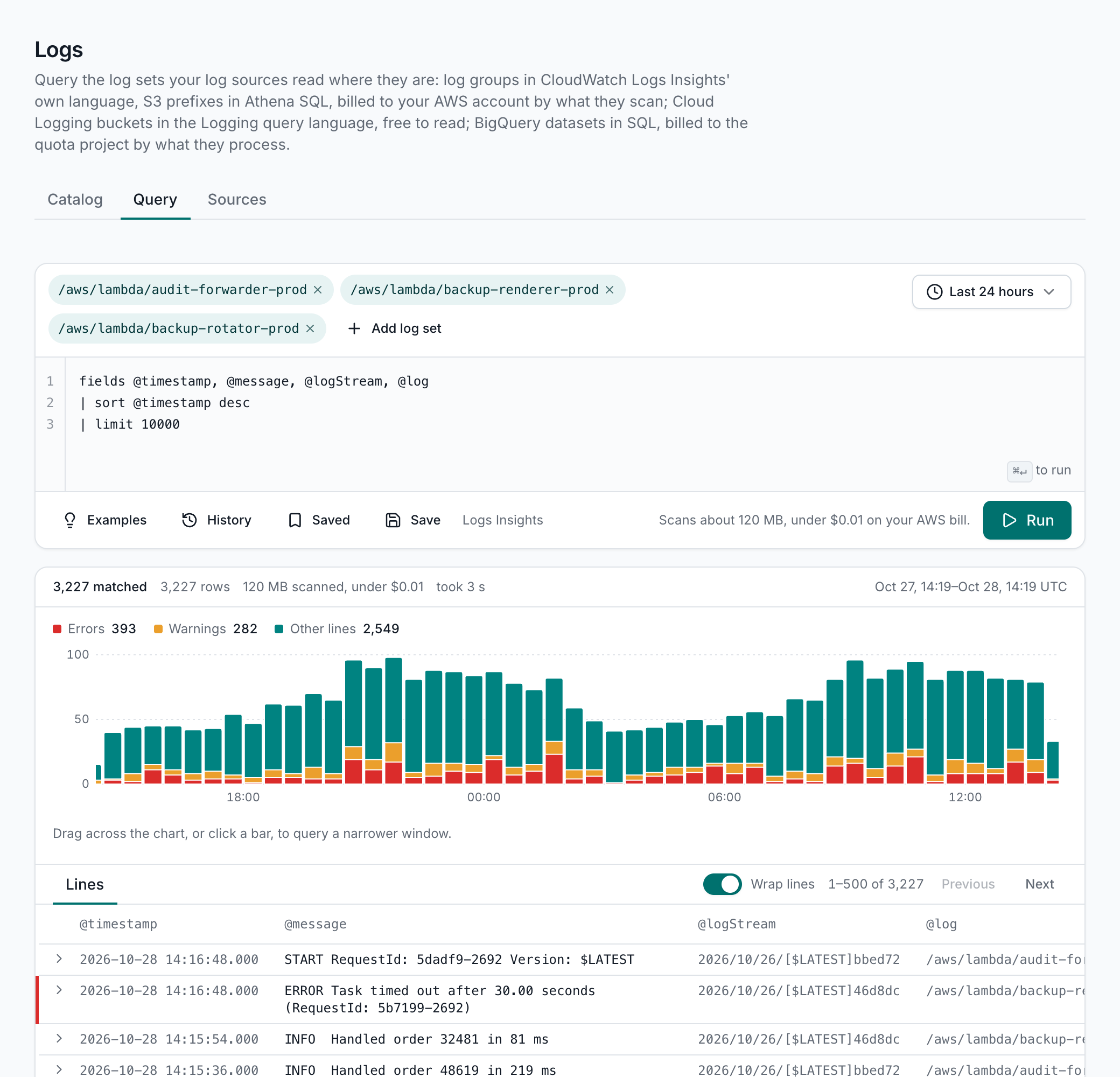
The Query tab works like a log tool: pick log sets and a time range, from the last 15 minutes to 30 days, or a window between two times. Then write a query in the engine's own language, so you can paste queries from your cloud's docs and your runbooks. Each language comes with example queries to start from.
| Logs | Queried with | Language | Your cloud charges |
|---|---|---|---|
| CloudWatch log groups | CloudWatch Logs Insights | Logs Insights query language | About $5 a TB scanned |
| Log files in S3 | Amazon Athena, in a workgroup of your own | Athena SQL | $5 a TB scanned, at least 10 MB a query |
| Cloud Logging buckets | Cloud Logging | Logging query language | Free to read |
| Log sinks' BigQuery datasets | BigQuery, in your quota project | BigQuery SQL | BigQuery's on-demand price for what it processes |
| Log Analytics workspaces | Azure Monitor's Log Analytics | KQL | Free on Analytics tables |
- A query reads up to 50 log sets at once, across accounts and regions, over at most 31 days. Logs Insights returns up to 10,000 lines from each account and region.
- An S3 prefix or a BigQuery dataset is queried on its own: the query names it as
{table}or{dataset}, and AssetHermit limits it to the range. - A Cloud Logging query returns the newest 2,000 entries it matches.
- A Log Analytics query is KQL over the workspaces you pick, and returns up to 10,000 rows. AssetHermit applies the range.
- Results show how many lines matched over time, colored by level. Drag across the chart to query that window. A
statsquery's rows are charted too. - Open any line to see all its fields, and copy it as JSON. Times are in UTC.
Saved queries and history
- Save a query with its log sets and range, for yourself only or for everyone in the workspace who may query its logs. Each person can save 50, and a workspace can share 100.
- Your recent queries are a menu in the editor. A query's record (its text, log sets, range and what it scanned) is kept 30 days, and its results never.
Your bill stays bounded
Queries run in your cloud, so your cloud bills them. AssetHermit shows what each one will cost before it runs, and keeps it within limits a workspace admin sets.
- Each query shows an estimate before it runs: from each log group's daily intake, from the size of an S3 range's files, or from BigQuery's dry run, which is exact. After it runs, it shows the bytes scanned and the cost.
- Each log source has a cap per query and per day, 10 GB and 200 GB to start with. A query estimated past the per-query cap runs only when an admin confirms it. Once the day's cap is spent, its logs can't be queried until the next day (UTC).
- A query that passes its cap is stopped. Athena's workgroup and BigQuery's billing limit stop it in your cloud itself. Any query still running after 15 minutes is stopped.
- Each person can run 3 queries at once and 60 an hour, which leaves your cloud's own query quotas for your team's other tools.
Analyses
A workspace admin can turn on a weekly analysis for a log set. It runs as a query with a weekly budget of its own, and keeps only its totals, never lines.
| Analysis | What it finds | Weekly budget |
|---|---|---|
| Observed traffic | Flows by interface and port over the last 7 days: what reached each interface from the internet, and what was refused. | 500 GB |
| Last accessed | When each bucket, storage account or key vault was last read and written over the last 30 days, from its access or audit logs. | 100 GB |
| Noisiest lines | The message patterns that make up most of an hour of the log group, priced by its ingestion. | 20 GB |
- Open ports, checked against real traffic. A security group open to the internet shows whether the internet reached it, tried and was refused, or was quiet, over the interfaces your flow logs cover. Its rule's page lists the reached ones first.
- Buckets nobody reads. A bucket that no one read in 30 days becomes a finding, priced as a saving from lifecycle rules or a cheaper storage class.
- An asset's Logs card shows its observed traffic, or a bucket's last read and write.
The assistant and AI clients
The AI assistant and AI clients can list your log sets and run a query as you, within your access and your caps: at most 2 GB a query, and 50 lines back. Log lines can hold text anyone wrote, so they reach the model marked as data, not instructions. A stored conversation keeps the query and the answer, never the lines.
Your logs
- Logs are read only through a log source you connect, and only what its credential allows.
- Results go to the person who asked, through your workspace's region, and are stored nowhere. They're never sent by email or to Slack.
- Every query is in the workspace's audit log, with its log sets, range and estimate, but not its text.