Change calendar
Every date your clouds already hold, by day: certificates that expire, maintenance, versions reaching end of support, retirements, commitments that end, and your own planned changes and freezes.
The Calendar page puts every dated fact your workspace holds in one place: what expires, what a provider scheduled, what reaches the end of its support and what ends. It reads only what AssetHermit already collects, so it needs no setup, no new permission and no extra call to your clouds. A date is always one your provider, a resource or a person gave: never a guess. It's included in the Starter, Team and Enterprise plans.
Change calendar is in beta.
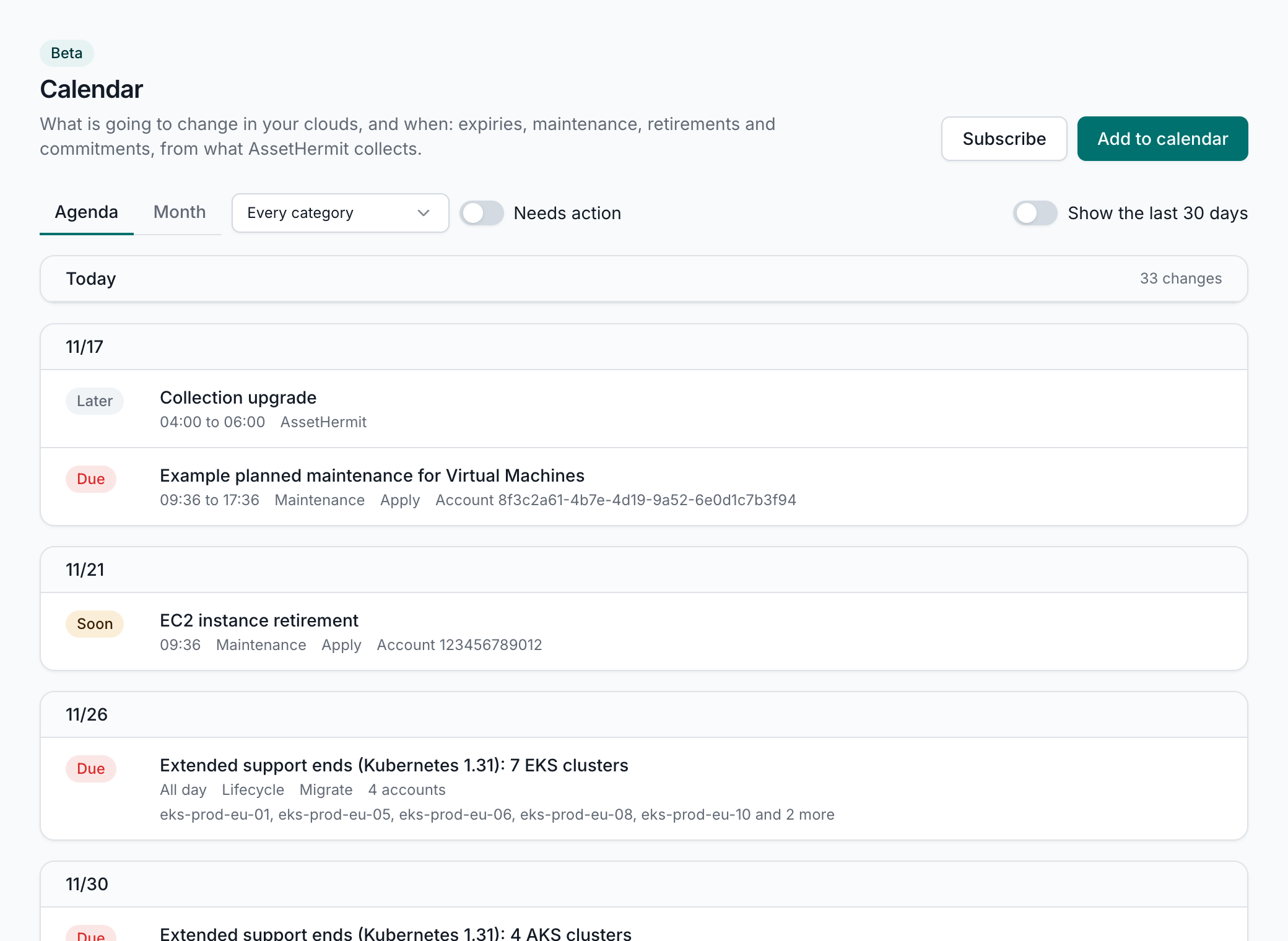
What's on it
The calendar reaches 30 days back and 400 days ahead. Each kind of date has fixed lead times, the same for every workspace: within the first it's due, within the second it's soon.
| Date | From | Due within | Soon within | To do |
|---|---|---|---|---|
| Domain registration expires Lifecycle | Route 53 domain registrations | 30 days | 60 days | Renew |
| Certificate expires Certificates | ACM certificates, IAM server certificates, SAML providers' metadata, Google Cloud SSL certificates, App Service certificates and Google Cloud uptime checks' certificates | 7 days | 30 days | Renew |
| Monitored certificate expires Certificates | The certificate your probe monitors last saw | 7 days | 30 days | Renew |
| Pending maintenance applies Maintenance | RDS databases, Aurora clusters and Lightsail databases with maintenance waiting to apply | 7 days | 30 days | Apply |
| Maintenance scheduled by the provider Maintenance | Provider health events that schedule maintenance or ask for action | 7 days | 30 days | Review |
| Key is deleted Lifecycle | AWS KMS keys scheduled for deletion | Always | Never | Review |
| Secret or key rotates Lifecycle | Secrets Manager and Secret Manager secrets, and Cloud KMS keys, that rotate | Never | Never | No action |
| Runtime reaches end of support Lifecycle | Lambda functions whose runtime AWS deprecates | 30 days | 90 days | Migrate |
| Standard support ends Lifecycle | EKS, GKE and AKS clusters, RDS and Aurora, ElastiCache for Redis OSS and OpenSearch Service versions | 30 days | 90 days | Migrate |
| Extended support ends Lifecycle | The same versions, where the provider offers extended support | 30 days | 90 days | Migrate |
| Provider retirement Provider changes | Cloud news retirements that affect your workspace | 30 days | 90 days | Migrate |
| Commitment ends Commitments | Savings Plans, reservations and commitments your bill names | 30 days | 90 days | Decide |
| Contract year ends Commitments | The contract years of your spend commitments | 90 days | 180 days | Decide |
| AssetHermit maintenance AssetHermit | AssetHermit's own scheduled maintenance in your organization's regions | Never | Never | No action |
| Planned change Your team | Your workspace admins | Never | Never | No action |
| Change freeze Your team | Your workspace admins | Never | 7 days | No action |
Assets with the same date for the same reason make one entry, such as "Runtime reaches end of support (python3.10): 412 Lambda functions". It names the first 5 and opens the inventory with a query that lists them all. Every other entry opens the page that owns it: the asset, the health event, the monitor, the news item or the commitment.
- Health events are the maintenance and scheduled changes AWS Health, Azure Service Health and Google Cloud's service health tell your accounts of, including Compute Engine's upcoming maintenance. Event types and services your workspace ignores are left out. See Provider health events.
- Retirements are cloud news items with a retirement date that affect what your workspace runs. See Cloud news.
- Commitments end on the date collection read or the one you typed in, and those of the same name ending the same day make one entry. Contract years come from your spend commitments. See Commitments and contracts.
- Monitored certificates are the certificates your probe monitors and Google Cloud uptime checks last saw. See Uptime.
- AssetHermit maintenance is what our status page announces for the regions your organization runs in.
Behind today, each day also shows how many changes were published and how many outages opened, linked to the change feed and the Uptime page.
Version support dates
Each cluster's and database's version gets the day its standard support ends and the day its extended support ends, where the provider publishes them. EKS's and RDS's and Aurora's dates come from AWS's own API at each sync, so they follow AWS in every region. The rest (GKE, AKS, ElastiCache for Redis OSS, and OpenSearch and legacy Elasticsearch versions) come from each provider's published support schedule, which we check regularly. A version the provider hasn't dated has no entry.
- On AWS, the end of standard support is when extended support starts billing. An EKS cluster's entry shows what extended support would add a month at AWS's list price of $0.50 a cluster-hour, in your reporting currency.
- On AKS, standard support is a version's end of life, and extended support is Long Term Support's end.
Urgency
Every entry has a badge:
- Due: within the kind's first lead time. A KMS key pending deletion is always due.
- Soon: within its second lead time.
- Later: further ahead, or something that asks nothing of you, such as a secret's rotation.
- Past: its date has gone, or, for an entry with an end, it has ended.
Where the provider handles a date itself, the entry says Handled by the provider and is never more than Later: an ACM certificate Amazon issued that's eligible to renew, a Google-managed SSL certificate, a domain with auto-renew on, and a health event that asks for no action or that someone marked handled.
An entry needs action when it's due or soon, asks for something (renew, apply, migrate, review or decide) and the provider doesn't handle it.
Agenda and Month
- Agenda lists the next 90 days, today included, with a card for each day that has something on it. Turn on "Show the last 30 days" to start 30 days back.
- Month lays a month out in weeks that start on Monday, with each entry as a chip coloured by its urgency. Past days are shaded by how many changes were published that day.
Filter either view by category, or to what needs action. Dates follow your own time zone and locale. When a source couldn't be read just now, or your assets' dates are still being worked out after a sync, the page says so and shows the rest.
On the dashboard and asset detail
- The dashboard's Coming up card lists the dates in the next 14 days that need action, the most pressing first. It isn't shown when nothing needs action.
- An asset's detail page shows the dates its own data holds, such as a certificate's expiry or a version's end of support, with their urgency.
Who sees what
- Every member of the workspace but Stakeholders sees the calendar.
- Members limited to some accounts see only their accounts' assets and health events.
- Commitments and contract years are shown only to people who see costs.
The week ahead
Each Monday, workspace admins get a notice of what needs action in the next 14 days, naming up to 10 dates and counting the rest. It leaves out what another notification already tells of, such as expiring commitments, provider health events and affecting cloud news, and nothing is sent in a week with nothing to tell. It arrives in the inbox, and by email only in the daily digest. See Notifications.
Planned changes and change freezes
On the Team and Enterprise plans, workspace admins add their own entries with Add to calendar: a planned change or a change freeze. Everyone who sees the calendar sees them, under the category Your team.
- Each has a title and either whole days (the last one included) or a start and end time, up to 92 days long.
- It covers the whole workspace, or only the accounts and asset groups you pick.
- It may link to a ticket, and hold notes of up to 2,000 characters.
- A workspace keeps up to 500 that haven't ended.
Changes to assets in an entry's scope are marked wherever they're shown:
- During freeze when your cloud's activity records show it was made in the freeze.
- Maybe during freeze when the sync that found it ran in the freeze, or within 24 hours after it ended, so it may have been made just before.
- Planned when it falls in a planned change.
The change feed filters to changes During a freeze or Unplanned, and the marks are also on asset detail's changes, change exports and the assistant's answers.
Workspace admins are told:
- A change freeze starts: a notice within a day of its start.
- Changes during a change freeze: a warning alert while changes land in a freeze, naming the newest, who made them and whether by hand. It resolves itself when the freeze ends.
A freeze is about your cloud only: AssetHermit's syncs, Sync now and email go on as usual during one.
Calendar feeds
Add a workspace's calendar to Google Calendar, Outlook or Apple Calendar with a link of your own. Feeds are off until an organization Admin turns them on in the organization settings' Calendar feeds card.
- On the Calendar page, Subscribe makes a link, for every category or only the ones you pick. Copy it at once: it isn't shown again, and anyone with it reads the feed. You keep up to 3 feeds in a workspace, and remove them there.
- A feed holds the last 30 days and the next 180, as you see them, in iCalendar format.
- Titles say only what and how many, unless you choose full titles with asset names, accounts and domains. Your calendar service keeps a copy of whatever the feed holds.
- A feed reads as you: leaving the workspace, or the organization turning feeds off, ends every link you made, and turning feeds on again never brings old links back.
In the assistant and MCP
The assistant and the MCP server have a read-only calendar tool, so you can ask what expires this month or whether anything is scheduled during a launch week. It reads a window of up to 120 days within the calendar's reach, narrowed by category, cloud, account or what needs action, with the same access you have.